Have a proper looksie at big pull requests
Looksie walks you through a pull request one decision at a time: a briefing first, then the parts that need your judgement, then your review, posted as you.
Free on public repositories, for good. Works with GitHub today. Not signed by Apple or Microsoft yet, so you approve it once: how.
Pull requests got bigger. Your day did not.
Coding agents write a lot, quickly, with a confident write-up on top. The real question gets buried: what am I actually agreeing to? Reading the diff top to bottom is slow, and another bot leaving comments just gives you more to read.
Looksie is not a bot. It is your own tool for doing the review, and it only speaks when you press Submit.
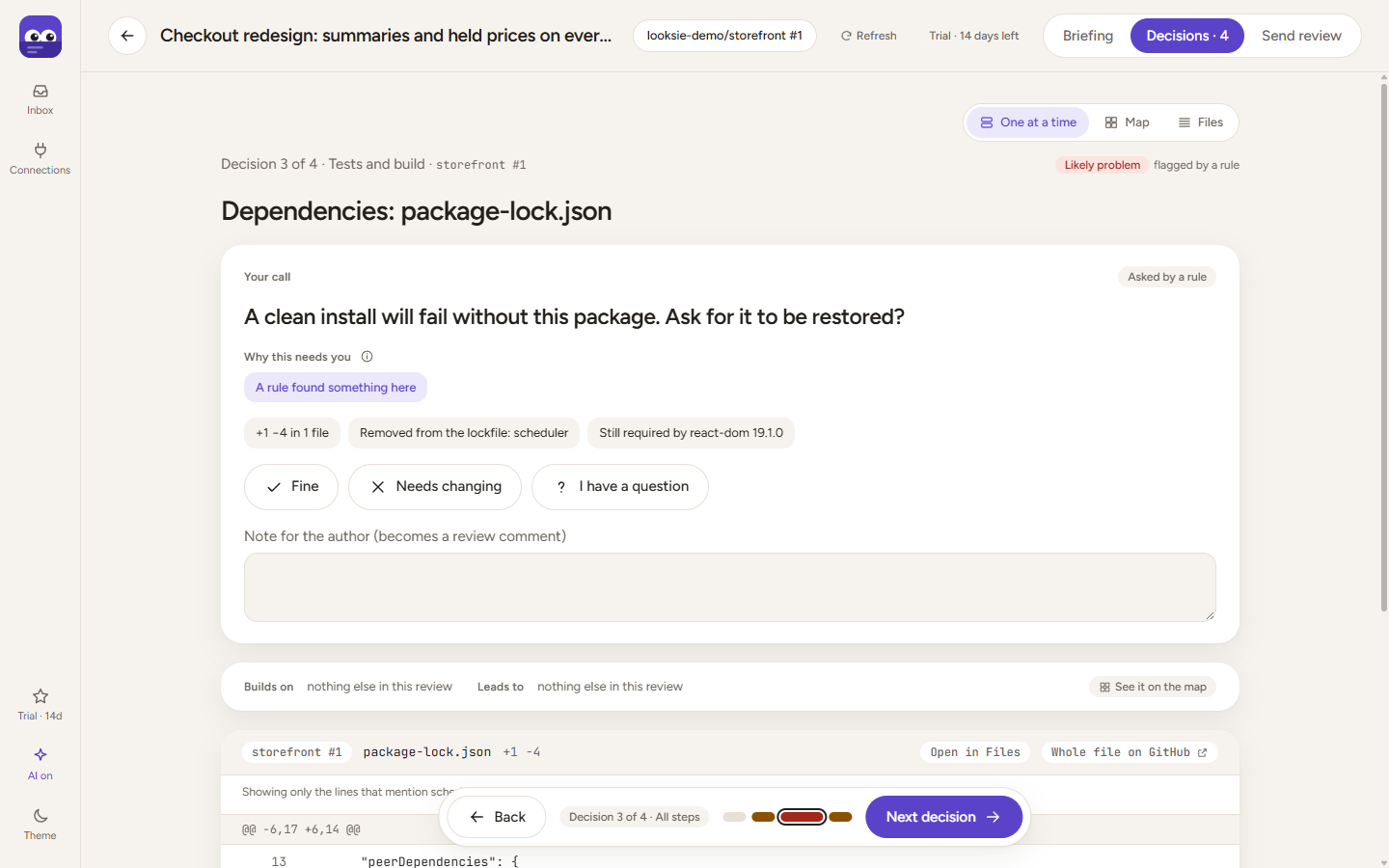
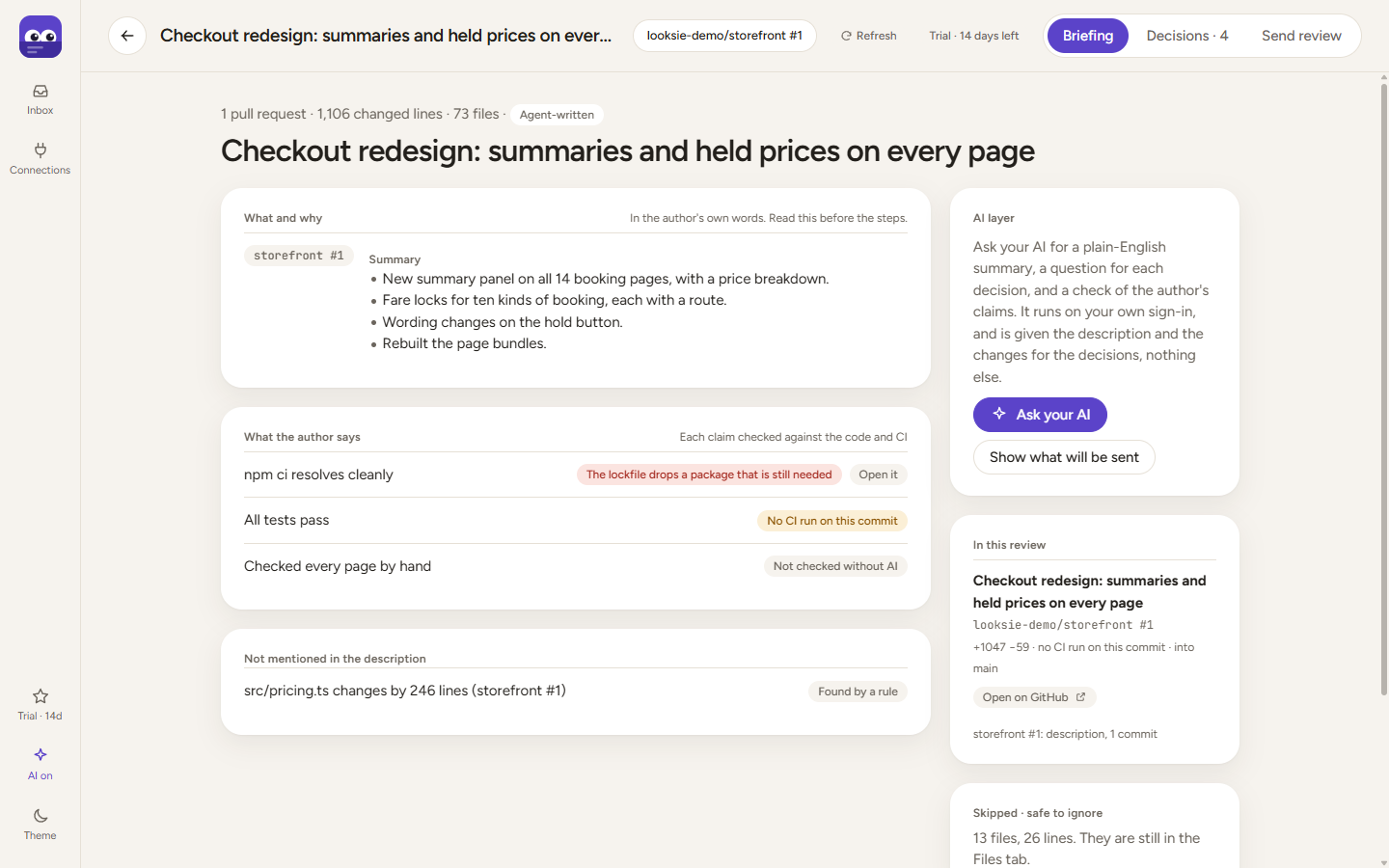
- Likely problemThe lockfile drops a package that something still needs. The description said a clean install works.
- Likely problemA new workflow that only runs by hand, on a branch where it cannot be started.
- Look closelyA migration that changes stored data, with no way back.
- Needs youA new secret or environment variable that someone has to set.
- Look closelyTests that were switched off, or quietly lost their assertions.
Three screens, in the order you would want them
The briefing
What the change is for, in the author's words. Each claim they make is checked against the code and the CI results, and anything that needs you (a secret, a manual step) is pulled out.
The decisions
The change is split into steps and read in order: data, server, screens, tests. Looksie picks the handful that need your judgement and says why. The rest is listed as quick looks, to glance at or wave through. How it decides.
Your review
Answer Fine, Needs changing or Question as you go, and comment on any line. At the end you see exactly what will be sent, then post one review. Nothing leaves until you press Submit.
Built for the size of change agents produce
A sensible number of decisions
A 2,000-line pull request comes out as about nine decisions. A sweep across a thousand files that all got the same edit is one quick look, plus the few that did not follow the pattern.
Several pull requests as one review
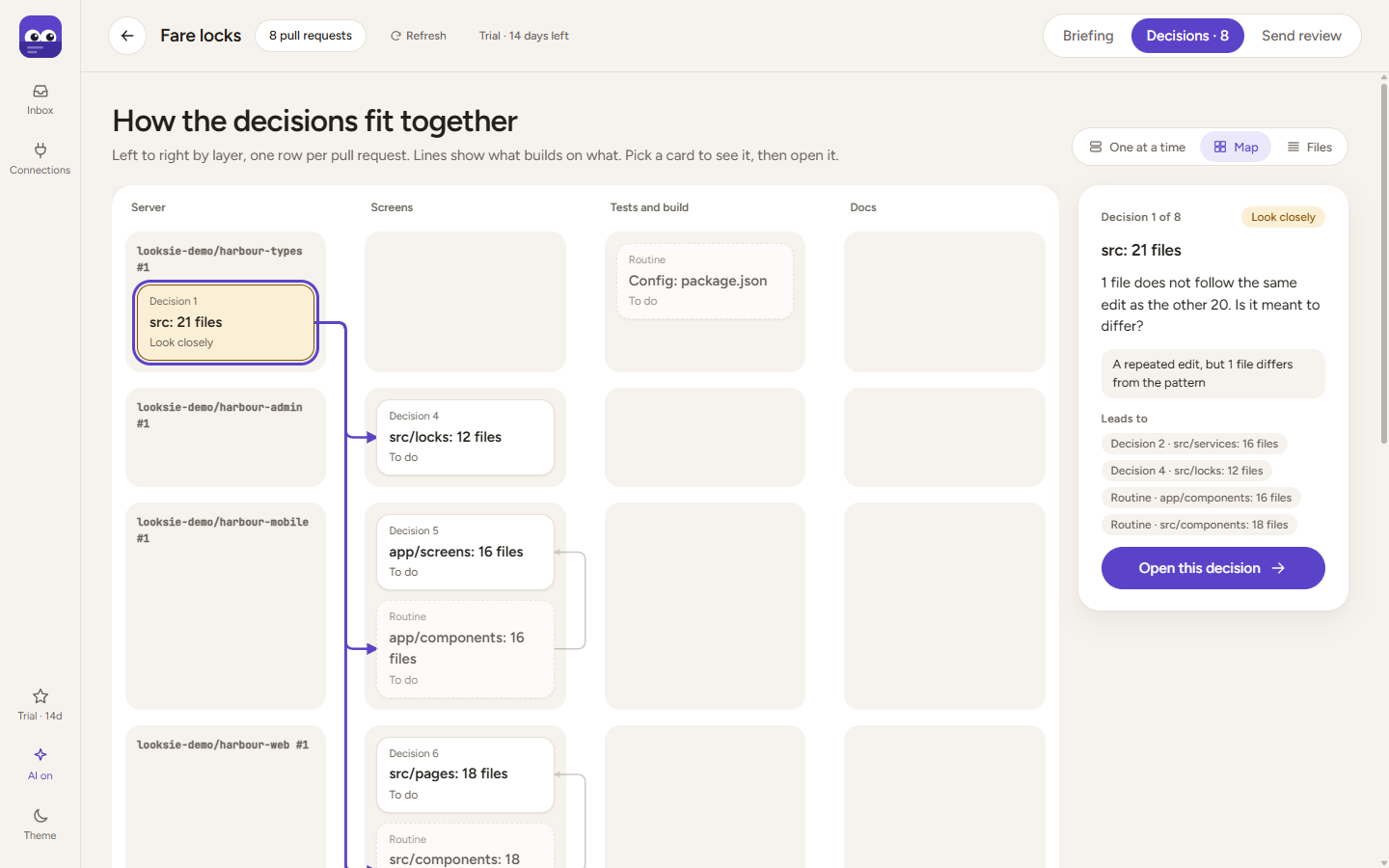
When pull requests point at the same issue or at each other, Looksie suggests reviewing them together, shows how they connect, and says which to merge first. You can also group them yourself.
Works without AI. Better with yours.
Everything above is rules and facts. Add your own Anthropic or OpenAI API key, or let your own Claude Code or Codex do it, for a plain-English summary and a sharper question per decision. Every answer has to quote a real line from the change, or it is thrown away.
The whole picture when you want it
A map of how the steps depend on each other, and every changed file with a link straight to the decision that asks about it.
Free on public code. Pro for private.
One simple line: if the repository is public, Looksie is free. Private repositories are part of Pro. Every feature and every connection is the same on both.
Free
$0
For open source, and for trying it properly.
- Every public repository
- The whole walkthrough
- Groups of pull requests
- The AI layer, with your own API key or AI agent
Pro
$10 a month, or $96 a year
For the code you are paid to review.
- Everything in Free
- Private repositories
- Use it on 3 of your devices
- 14-day free trial, no card
- 14-day refund, no questions
Coming to Pro*
- Ask AI about a decision: talk a change through before you choose
- Your own rules: checks for the things your team cares about
First 100 Approvers: 40% off the yearly plan, for life. Use code APPROVERS at checkout.
Or download it and try Pro free for 14 days first. Your licence key arrives by email; paste it into Looksie.
* Planned, and subject to change. You pay for what Pro does today.
Your code stays where it is
Looksie runs on your computer. There are no Looksie servers and no accounts, and it collects nothing about you.
- It talks to GitHub with your own sign-in, to read pull requests and, when you press Submit, to post your review.
- If you use the AI layer, the prompt goes straight to Anthropic or OpenAI with your own API key, or to your own Claude Code or Codex when it asks Looksie. You can read the exact prompt first.
- Every part of Looksie that touches your code, your tokens or the network is open source, so you can check this yourself.
Questions
Can Looksie miss things?
Yes. Looksie decides where to look first. It never says the code is right, and never approves for you.
On a big pull request, the riskiest parts come first as decisions. Everything else is still there as quick looks, each saying why. Glance over them; don't skip them.
It can miss a bug no rule looks for, or anything outside the change, like real data. AI answers can be wrong too, so each must quote a real line and is marked as AI.
What does it actually check?
Packages dropped from the lockfile that something still needs. Workflows that can't start. New secrets or settings someone has to set. Migrations that change stored data. Tests switched off. A page changed but its built copy not. The odd file out in a big repeated edit. Claims in the description that the code or CI disagrees with. Then it weighs the rest: databases, sign-in, money, and edits to existing code. It never runs your code.
Is this another bot that comments on my pull requests?
Nope. Looksie never comments by itself. It only posts your review, when you press Submit.
Do I need AI?
No. Everything works without it. For a summary and sharper questions, add your own Anthropic or OpenAI API key (usually a few cents a review), or connect your own Claude Code or Codex in one click: your agent gets a Looksie review skill, does the work on your plan, and its answer appears in Looksie.
Which hosts does it work with?
GitHub, including GitHub Enterprise. Azure DevOps and GitLab are planned, and will be the same on Free and Pro.
My computer says it doesn't recognise the app.
Looksie isn't signed by Apple or Microsoft yet, so your computer asks once. Windows: "More info", then "Run anyway". Mac: open it once, then System Settings, Privacy & Security, "Open Anyway". Updates install without asking again. Step by step.
How does buying work?
Buy here or from Looksie's plan screen. Our payment partner, Polar, emails your licence key; paste it into Looksie and Pro switches on. Change or cancel your plan any time in Polar's customer portal.
What if I reinstall, or get a new computer?
Your licence is a key, not an install. Paste it again and you're back. It works on three of your own devices at once.
Can I get my money back?
Yes. Within 14 days, no questions.